Websites
Product variants for your online store: each combination with its own price
Product variants let one product in an online store come in several sizes or colours, each with its own price, stock and SKU. On OneCraft the agent writes them with the catalog guide when your brief mentions sizes or colours: a product_options table for the choices and a product_variants table for each combination.
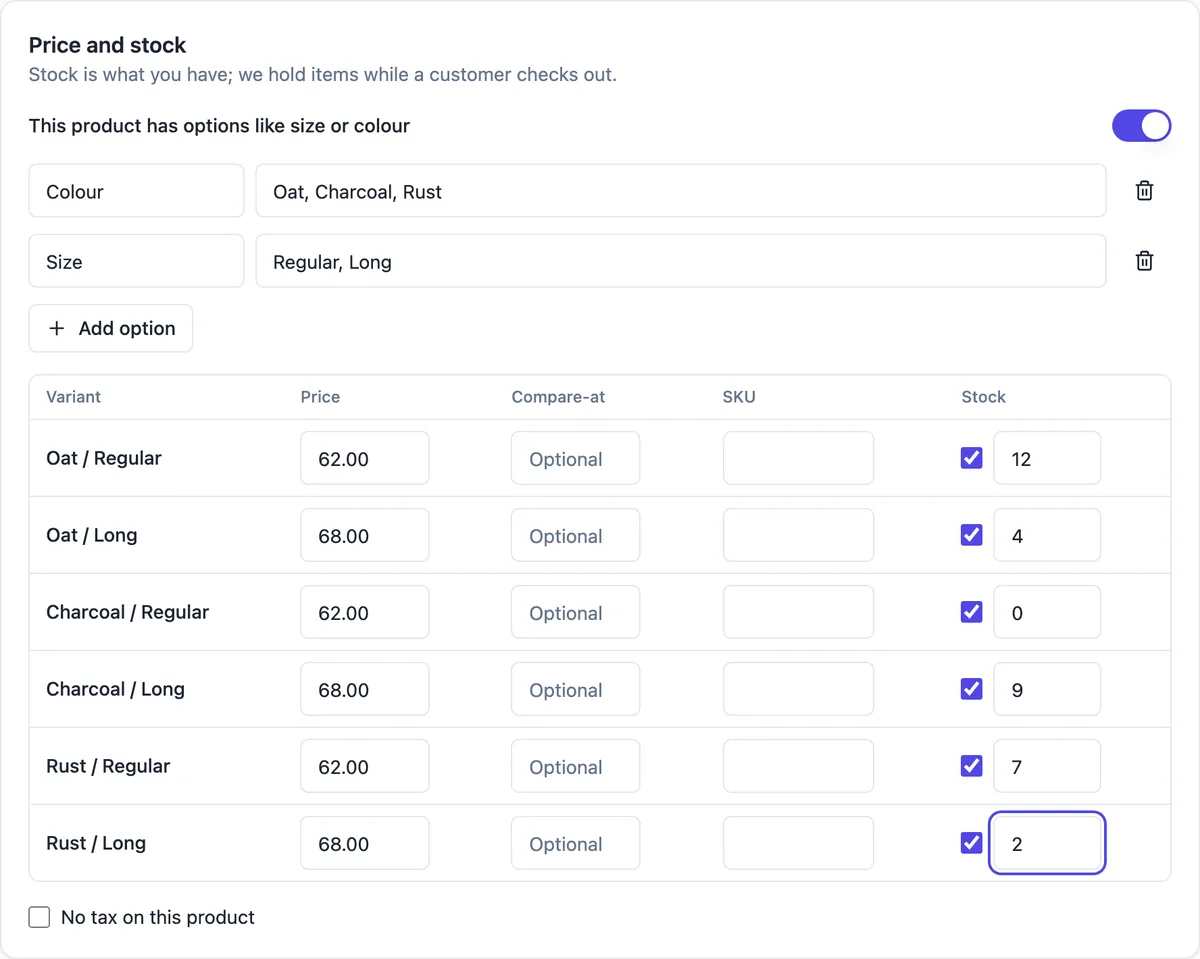
Options and variants
Options are the choices a buyer makes, such as Size with S, M and L, stored per product. A variant is one combination, such as Medium in Navy, with its own price in cents, stock and SKU. Variants are added when combinations have their own price or stock; a product that only needs a choice keeps options alone.
On the product page and in the order
The product page shows each option, the price and a stock note, and Add to cart when the site has orders. The cart line carries the chosen variant, and place_order reads that variant's price and stock from the database, so the buyer pays what the variant costs. The order line keeps the option values, so you see exactly what to send.
Stock per variant
With inventory tracking, each variant has its own stock and reorder level, and sales add sold movements against the variant. The low stock list can then show that a small in black is running out while the other sizes are fine.
Editing in the admin
The product form in your site's admin has the options, category, images and price. Variants are rows admins edit like any other admin table, with their price, stock and SKU, and only admins can write them. With the csv capability they can also come in from a file once the products exist.
How it works, in three steps
Step 1
Name the options in the brief
In the generator, say which products come in which sizes or colours and which cost more, or ask in chat to add variants to an existing shop.
Step 2
Give it a database
Every plan gets a hosted site database, or you can connect your own Supabase account in the site's Settings, Database card. Connect Stripe in account Settings, Payments for card payments.
Step 3
Check it and publish
Sign in to /admin with the admin account the agent reports, try it in the preview, then publish from the builder on a paid plan.
Limits worth knowing
- Options and variants are added when the brief or a chat message asks for sizes, colours or other choices.
- Prices are whole cents and are read from the variant row when the order is placed, never from the page.
- Card payments need Stripe connected in account Settings, Payments, and a paid plan. The platform fee is 2% on Starter, 1% on Pro and 0.5% on Pro+, with Stripe's own fees on top.
- A hosted database comes with every plan, or you can connect your own Supabase account in the site's Settings, Database card.
- The Free plan builds and previews a site but cannot publish it, connect a domain, take payments or run Expo builds.
Questions people ask
Do I need variants if every size costs the same?
Not always. If all sizes share one price and you do not track stock per size, options alone are enough: the buyer picks a size and it is saved on the order line. Add variants when a combination has its own price or its own stock, such as a larger size that costs more or a colour that sells out first.
Can each variant have its own SKU?
Yes. Each row in product_variants has a SKU field beside its price and stock. SKUs help when you count stock, reorder from a supplier or match orders in your accounts. They are optional, so a small shop can leave them empty and fill them in later in the admin.
What does a buyer see when one size sells out?
The product page shows a stock note, and place_order refuses an order for a sold out variant at the moment of ordering, with a message the checkout shows in plain words. The other sizes stay available. Restock it with a received movement when inventory tracking is on, or by editing its stock in the admin otherwise.
Can a single variant go on sale?
Each variant has its own price, so lowering one variant's price puts just that combination on sale. Products also carry a compare at price for showing an old price beside the new one; ask in chat if you want a compare at price per variant as well, and the agent changes the table and the page together.
Do variants appear in Google results?
With the seo capability, product pages can carry Product structured data with their offers, built only from facts on the page. Ratings are added only from real reviews, never invented. Google decides what to show, so treat structured data as a help to search engines rather than a promise of a rich result.
Make your own website
The button opens the generator with this use case already described. Change the wording to match yours, generate, then edit anything you like.
Create a website with OneCraftNot ready to start? See the AI website builder page first.
Related pages
Import products from CSV with a preview before anything is added
To import products from CSV, you match a spreadsheet's columns to your product fields and add the rows in one go. On OneCraft the agent writes the importer into your site's admin with the csv guide: pick a file, see the first 50 rows with problems marked, then insert them in batches, and export any admin table the same way.
Shipping rates for your online store: zones, fees and delivery slots
Shipping rates for an online store decide what a buyer pays to get the order, usually by where they live and how much they spend. On OneCraft the agent writes them into your checkout: rates by country with the orders guide, or delivery zones by postcode with fees, a minimum order, free delivery over an amount and time slots with the delivery guide.
Website with online booking, written from your brief
A website with online booking lets a customer pick a service, a person and a free time, and get a confirmed booking without a phone call. What makes it trustworthy is that two people can never take the same slot, and that customers can see and cancel their own bookings.
More finished work of this kind is on the website examples hub.
Written and checked by the OneCraft team. Last checked .