Websites
Sell gift cards online from your own website
Selling gift cards online means a customer pays now for a code someone else spends later, on your site or in your shop. The code has to be hard to guess, the balance has to be right after every use, and only the buyer and your staff should ever see it.
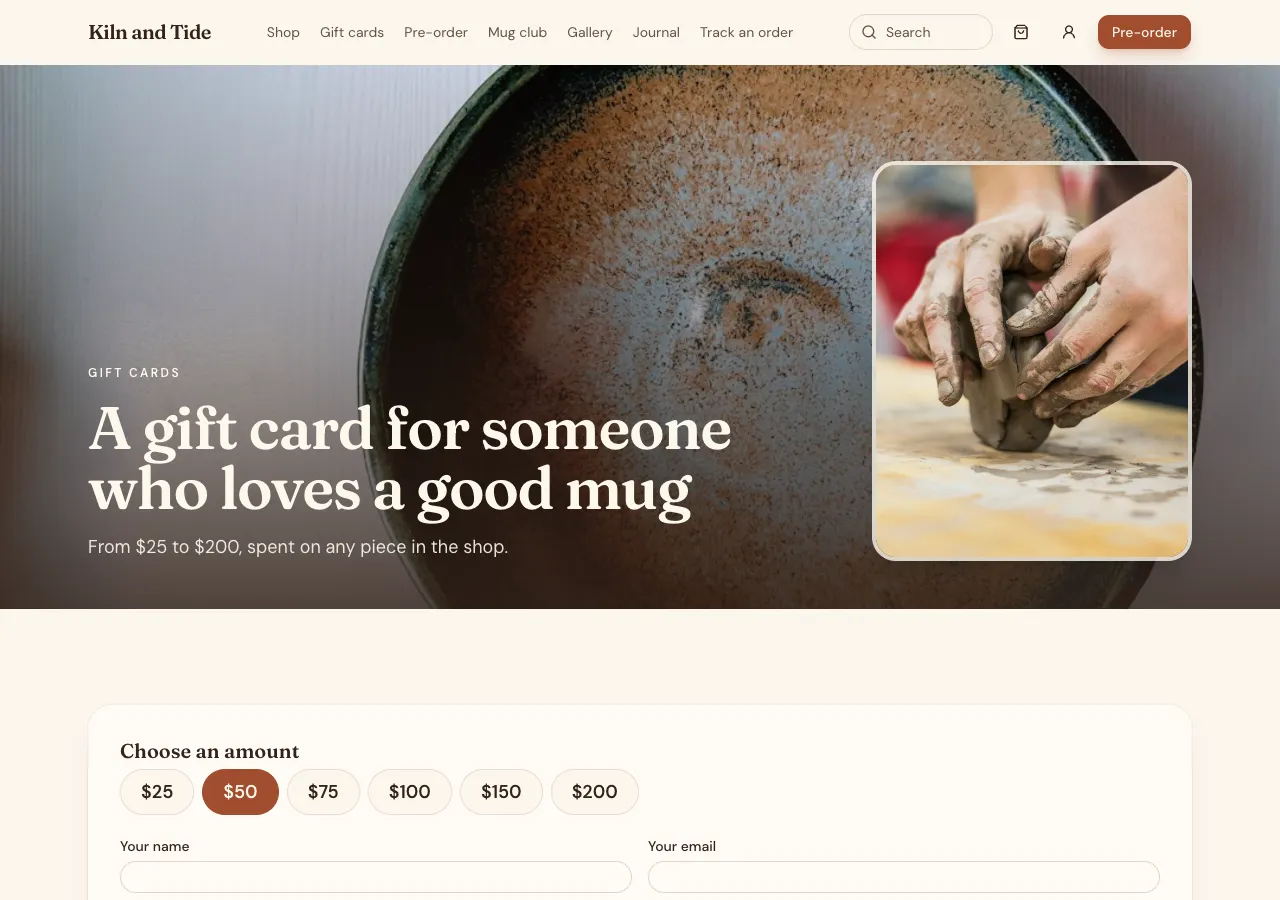
Cards for sale
Ask for gift cards and the AI follows its giftcards guide: a gift card is a product with fixed amounts or a free amount between limits, bought through the site's cart and paid by Stripe Checkout on your connected account. The buyer adds a recipient name, email and message.
Codes issued after payment
When Stripe confirms the payment, the database issues one card per gift card bought: a 16 character code from an alphabet without look alike letters, formatted in groups of four, with its starting balance and expiry. The thank you page and the buyer's account show the code with Copy and a printable card.
Redeeming online and in store
At checkout a single field takes a gift card or a discount code; a gift code takes the balance off the order, up to the total, inside the order function, which locks the card first. In your shop, staff enter an amount to deduct in the admin. A cancelled or refunded order puts the balance back.
Balance check and history
A balance page lets anyone with a code see its balance and expiry, and nothing else. Every change is an event in the card's history, issued, redeemed, refunded, adjusted or used in store, which staff see in the admin with search by code. Staff can also issue a card by hand, for a prize or a refund.
Expiry and the law
In Australia, gift cards sold to consumers must be valid for at least three years, with exceptions, and the expiry date must be shown. With no expiry in your brief, the AI sets none. The site never emails the recipient: the buyer forwards the code, emails it to themselves first, or prints the card.
How it works, in three steps
Step 1
Describe the cards
Give the amounts or range, expiry, and whether cards work online, in store or both.
Step 2
Connect Stripe
Connect Stripe in account settings, Payments, so cards can be bought.
Step 3
Check and publish
Buy a card in the preview, redeem part of it, check the balance, then publish.
Limits worth knowing
- Card payments need a paid plan and Stripe connected in account settings; the platform fee is 2% on Starter, 1% on Pro and 0.5% on Pro+, with Stripe fees on top.
- The site does not email recipients; the buyer forwards or prints the card.
- In Australia most gift cards must be valid for at least three years.
- The data lives in the site's own database: a hosted one on every plan, or your own Supabase account.
Questions people ask
Can customers choose their own amount?
Yes, between a minimum and maximum you set. The order function checks the amount is inside those limits before payment, so nobody can buy a card for a cent or for a typo of thousands. Fixed amounts can sit beside the free amount as quick choices.
How does the recipient get the card?
The buyer sees the code on the thank you page and in their account, and can email it to themselves to forward, or print a card page. The site does not send mail to the recipient, because site mail only reaches the signed in sender or the owner.
Can a gift card be used in my shop?
Yes. Staff look the card up in the admin by its code and enter the amount used, which takes it off the balance with an in store event. The online and in store balances are one, so a card can be spent partly online and partly at the counter.
Are gift card codes safe from guessing?
Codes are 16 characters from a random source, which makes guessing impractical, and the balance page returns only the balance and expiry. The full list of codes is visible only to staff. Never show a code publicly, such as in a social post, since anyone with it can spend it.
Do gift cards expire?
Only if you set an expiry. In Australia, most gift cards sold to consumers must be valid for at least three years, and the expiry has to be shown on the card. The AI sets no expiry unless your brief gives one, and the balance page shows it.
Can someone use a gift card and a discount code together?
The checkout has one field that accepts either. Ask for both to work together and the AI adds a second field and the rule for which comes first. Gift cards reduce what is left to pay; discount codes reduce the price, so the order matters for the total.
Make your own website
The button opens the generator with this use case already described. Change the wording to match yours, generate, then edit anything you like.
Create a website with OneCraftNot ready to start? See the AI website builder page first.
Related pages
Ecommerce website with Stripe: Checkout on your own account
An ecommerce website with Stripe sends buyers to Stripe Checkout to pay and records the order when Stripe confirms it. On OneCraft the agent writes the shop as code, and payments run as a direct charge on the Stripe account you connect, with prices read from your site's database, never from the browser.
Sell digital products online from your own site, delivered privately
To sell digital products online you need a way to take payment and then hand the file to the buyer, and only to that buyer. On OneCraft the agent writes this with the downloads guide: files kept in a private bucket on the site's database, unlocked by a paid order, and listed in the buyer's account with Download buttons.
Rental booking website with availability and deposits
A rental booking website lets customers see when something is free, book it by the hour, day or night, and secure it with a deposit. It works when several identical units are counted correctly, cleaning time between rentals is kept, and the price is worked out in one place.
More finished work of this kind is on the website examples hub.
Written and checked by the OneCraft team. Last checked .