Websites
Multi page website builder: pages, menus and addresses that stay linked
A multi page website gives each service, audience or topic its own page with its own address and search listing. The work is less in making pages than in keeping the menu, the links and the addresses consistent as the site grows, which is what a builder should do for you.
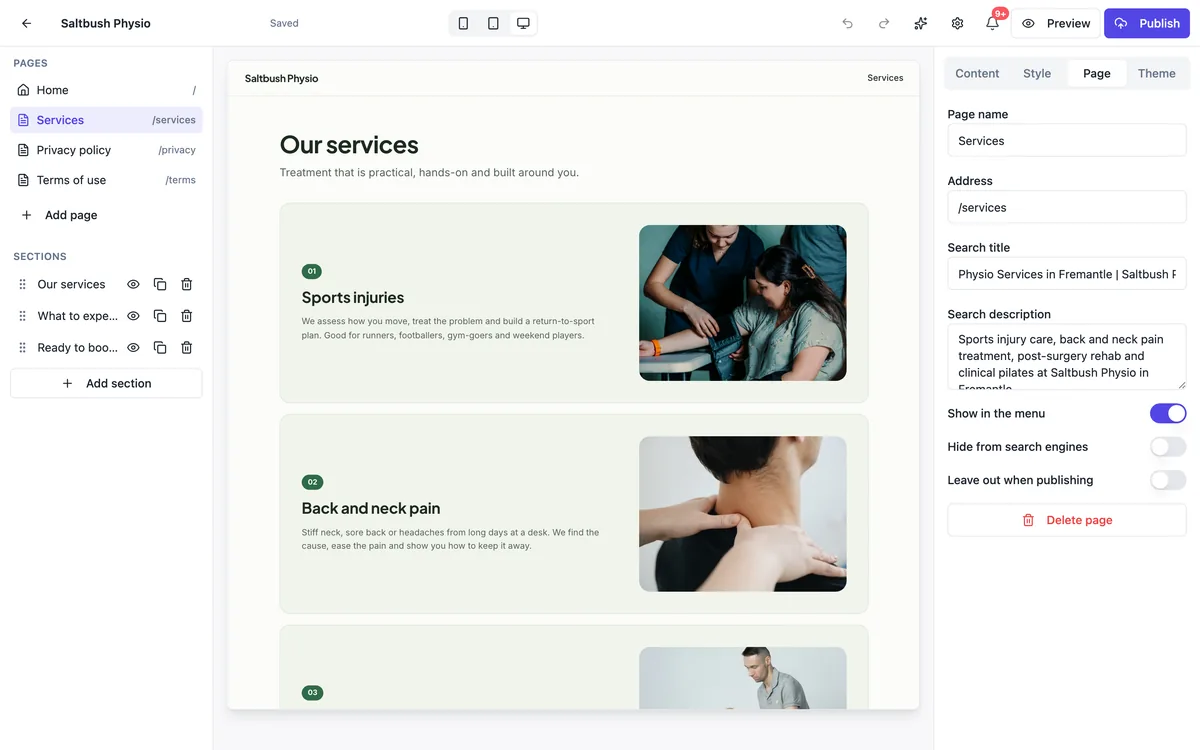
Each page is its own listing
Every page the AI writes has its own address, such as /services or /ev-chargers, and its own title and description for search results: a page cannot finish without them. Published, each page carries a canonical address. Ask for share previews and structured data and the AI adds Open Graph tags and JSON-LD per page. That is what lets a page about EV charger installs compete for that search on its own.
Planned before it is written
The generator starts with a plan: the pages, what each one says and the shared parts such as the menu and footer. The home page is built first, then the other pages four at a time, and a reviewer reads the built site and its screenshots before it is handed to you. Name the pages you want under Options, or in the description, and the plan follows them.
Links that stay in step
Internal links are written with the router's link component, so they work in the preview and on the published site alike, and every build fails if a page overflows a phone screen or throws an error. When you ask the chat to rename or remove a page, it updates the menu, the footer and the buttons that pointed at it in the same change, and the build checks the result.
How many pages to start with
Home, one page per main service or product group, about, contact, plus privacy and terms pages when you collect details. For most small businesses that is five to eight pages. More pages only help when each answers a different question someone searches for; a page per suburb with the same text is the kind of thin content search engines discount.
Adding a page later
Ask for it: add a page for EV charger installs after services and link it from the menu. The AI writes the page, its title and description, and the links, then builds the site so the new page shows in the preview. Each change is a version, so a page you do not like is one restore away. The colours, fonts and footer are shared, so the new page matches the rest.
How it works, in three steps
Step 1
Name the pages
List the pages you want in the description or under Options, Pages, with a line on what each one says.
Step 2
Generate and check
The AI plans, writes and reviews every page; read each one and ask the chat for changes.
Step 3
Publish the site
On a paid plan, one publish puts every page live with the menu and links together.
Limits worth knowing
- Pages are added, renamed and removed by chat; the files are read only in the builder.
- The colours, fonts, menu and footer are shared by every page of a site.
- A sitemap.xml is written only when you ask and the site's domain is known.
- Publishing is on the paid plans; the free plan builds and previews.
Questions people ask
Do multiple pages help with Google?
They help when each page answers a different search. A page for each service lets its title, description and copy match what people type for that service, and links between them help search engines find them all. Splitting one topic into several near identical pages does not help and can hurt, because the pages compete with each other.
Can two pages have the same address?
No. Each page is a route in the site's code, and two routes with the same address would fail the build, so the AI keeps them apart. Addresses use lower case words and hyphens, and a page can sit under another, such as /services/ev-chargers. Ask the chat to rename one if you want a different address.
What happens to links when I remove a page?
Ask the chat to remove it, and it takes out the page, its menu item and the buttons that pointed at it in the same change, then builds the site to check nothing broke. If you shared that page's address elsewhere, ask for the link to point at the closest page instead before you remove it.
Can different pages have different designs?
Yes. Each page is written for what it has to say, and the reviewer asks for variety between pages, so a pricing page and a gallery page look different. The colours, fonts, corners and spacing are shared tokens across the whole site, which keeps it feeling like one business.
Is there a limit on the number of pages?
No page cap is set. The practical limits are the time a generation takes, a turn's limits when you add many pages at once, and the work of keeping many pages accurate. A small business site with eight useful pages will usually serve visitors better than one with thirty thin ones.
Can a page sit under another page?
Yes. An address can have more than one part, such as /services/ev-chargers, which reads well and groups related pages. Link a nested page from a card or button on its parent page as well as from the menu, so visitors who land on the parent see where to go next.
Make your own website
The button opens the generator with this use case already described. Change the wording to match yours, generate, then edit anything you like.
Create a website with OneCraftNot ready to start? See the AI website builder page first.
Related pages
Help centre website with FAQs and search
A help centre website answers customers' common questions before they write to you. It works when people can search in their own words, answers are short and current, and the owner can see which answers are read most and which do not help.
Website with a blog you write in the admin
A website with a blog lets the owner publish news, guides and updates without asking a developer, and lets each post be found on its own in search. The work is in a simple editor, drafts that stay hidden until ready, and posts that carry their own titles, descriptions and images.
One page website maker: one scroll, one job
A one page website puts everything a visitor needs on a single scrolling page: what you offer, why to trust you, the details and one clear action. It suits a small offer, a launch or an event, and it falls short once people arrive looking for one specific thing among many.
More finished work of this kind is on the website examples hub.
Written and checked by the OneCraft team. Last checked .