Websites
Edit your website with AI chat: describe the change, review it, keep or undo
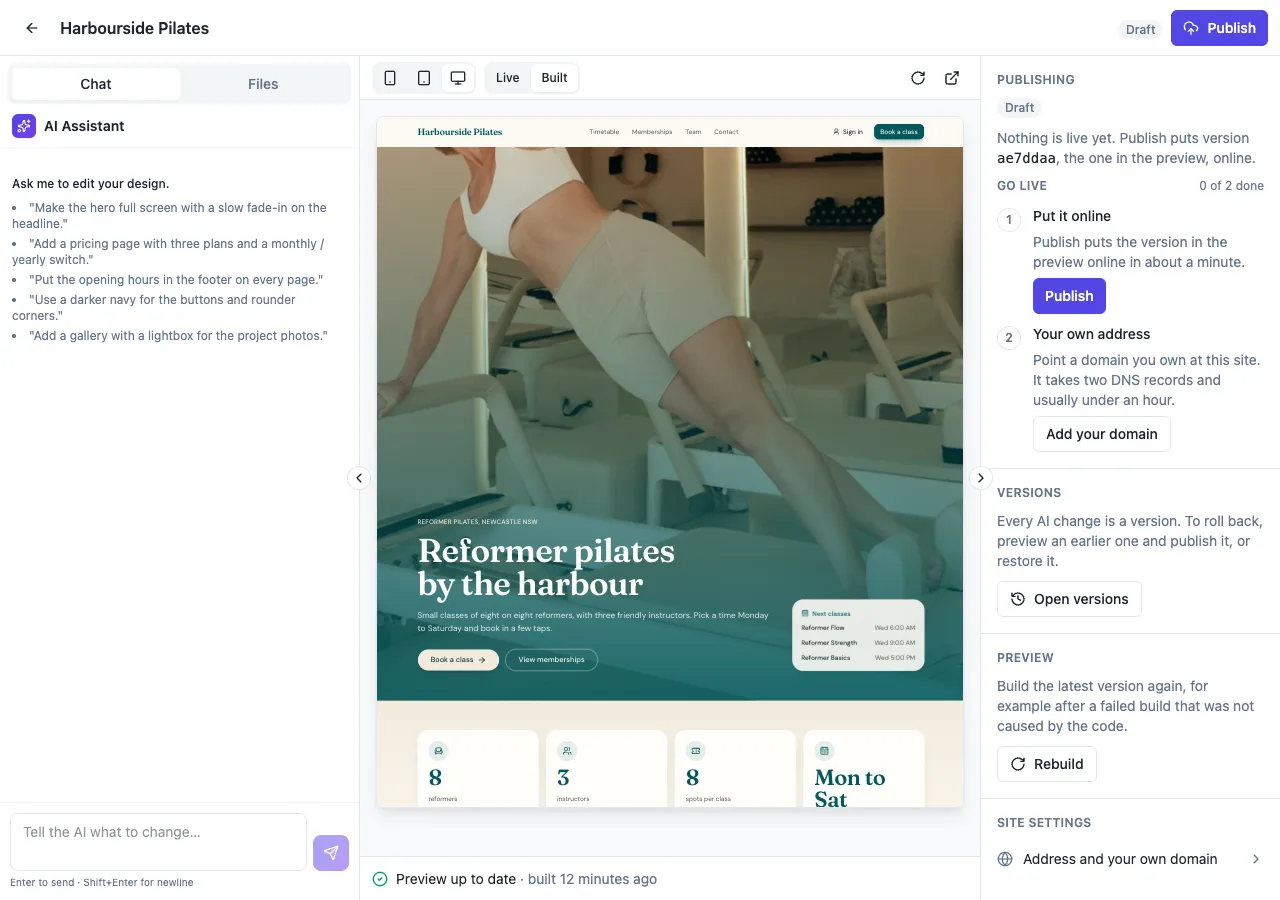
Editing a website with AI chat means typing what you want, such as add a pricing page after services, and having the AI change the site's code and rebuild it. The useful part is not the typing, it is that every change is listed, built, previewed and reversible before you publish.
What it can change
Anything in the site, because the site is code the AI wrote: the wording on a page, a new page linked from the menu, a different layout for the home page, the colours and fonts, the footer, the photos and the page titles search engines read. It can also add a feature that needs data, such as online booking, a members area or an order form; the words in your message pick the matching capability guide, and the AI builds the tables, access rules and screens into the site's own database.
Every change listed and built
Each turn comes back with a short reply and the list of files it changed, and Jump opens any of them read only. While the AI writes, the live preview shows the edits as they land. When it finishes, the site is built and checked at phone, tablet and desktop widths. If that build fails, the turn is rolled back to where it started, the site stays as it was, and Let AI fix it sends the first error line back to the AI.
Versions instead of undo
Every finished turn is a version. Versions lists the newest 50 with their messages; Preview pins one in the preview pane and Restore makes it the current site again as a new version with its own build. So a change you do not like is never a dead end: restore the one before it and ask again with more detail.
It knows the site
The AI keeps a short map of the site, its pages, components and content files, and reads it first on every turn, along with your recent messages. That is why a follow up such as make that section darker or add the same banner to the contact page works without naming files. One turn runs at a time per site.
What it costs and where it stops
A chat turn needs at least 2 credits available and is billed by the model use of that turn at 1 credit per US cent; builds are free. Small edits measured about 4 credits each. Messages can be up to 4,000 characters, and a turn stops after 30 tool calls, 8 minutes or 3 builds, keeping its last green build. The chat edits the site in the builder; nothing goes live until you publish on a paid plan.
How it works, in three steps
Step 1
Open the chat
Open the site in the builder; the chat sits beside the live preview, or in its own tab on a phone.
Step 2
Ask for a change
Describe it in plain words: what to add or change, on which page, with which details.
Step 3
Check and keep
Read the reply and the changed files, check the preview at each width, restore an earlier version if needed, then publish.
Limits worth knowing
- A turn needs 2 credits available and bills only its model use; builds are free.
- Messages are up to 4,000 characters; one turn runs at a time per site.
- A turn stops at 30 tool calls, 8 minutes or 3 builds.
- A change whose build fails is rolled back; publish to put changes live, on a paid plan.
Questions people ask
Can the chat write new copy for a page?
Yes. Ask for a rewrite in a tone or length, such as shorter and friendlier, or give it the facts to include. It writes only facts you give or that are already on the site, never invented ones, so name prices, hours and qualifications yourself. The changed content file appears in the turn's list, so you can read exactly what moved.
Can it add photos?
It searches Unsplash and Pexels for fitting stock photos and places them with sizes set. It never uses a stock face as you or your staff, and it does not generate images. Your own photos need a place to live: ask for an admin area with uploads, which stores them in the site's own database storage.
What happens if the chat misunderstands me?
Open Versions and restore the version before that turn, which brings the whole site back as it was. Then ask again with more detail, naming the page and the part of it, such as on the services page, the second block. Short, specific requests give the most predictable results.
Can I ask it to redesign the whole site?
It can change colours, fonts and the layout of every page, but large requests take longer and can hit a turn's limits. Split them: colours and fonts first, then the home page, then the other pages, checking the preview each time. Each step is its own version, so you can keep the parts you like.
Does the chat publish my changes?
No. The chat changes the site in the builder and builds it for the preview. The live site changes only when you press Publish, which builds that version and puts it online, and each publish is kept so you can roll back. Publishing is on the paid plans.
Can I edit the code myself instead?
Not inside the builder: the files are read only there, and every change goes through the chat. You can download the project as a zip and work on it in your own tools, but changes made outside are not brought back into the builder, so pick one place to work.
Make your own website
The button opens the generator with this use case already described. Change the wording to match yours, generate, then edit anything you like.
Create a website with OneCraftNot ready to start? See the AI website builder page first.
Related pages
Website with a database of its own, written by AI
A website with a database stores what people add, such as bookings, orders, members or form answers, and reads it back on its pages. The questions that matter are where that data lives, who can read each row and who can change it, and those are decided before the first visitor arrives.
Live preview while the AI builds your website
A live preview shows the site changing while the AI is still writing it, instead of a progress bar followed by a reveal. It is the fastest way to catch a misunderstanding early, before the AI spends the rest of the turn on the wrong idea.
Landing page generator: one offer, one action
A landing page is a single page with a single job, such as joining a waitlist, booking a call or buying one product. A generator helps most when it builds the page around that one action and leaves out everything that competes with it.
More finished work of this kind is on the website examples hub.
Sources
Written and checked by the OneCraft team. Last checked .