Websites
Website contact form: every message stored in your site's admin
A website contact form lets visitors send you a message without opening their email, and keeps each message where you can answer it. On OneCraft the agent writes the form and its table with the forms guide, and you read and mark responses in an admin area on your own site.
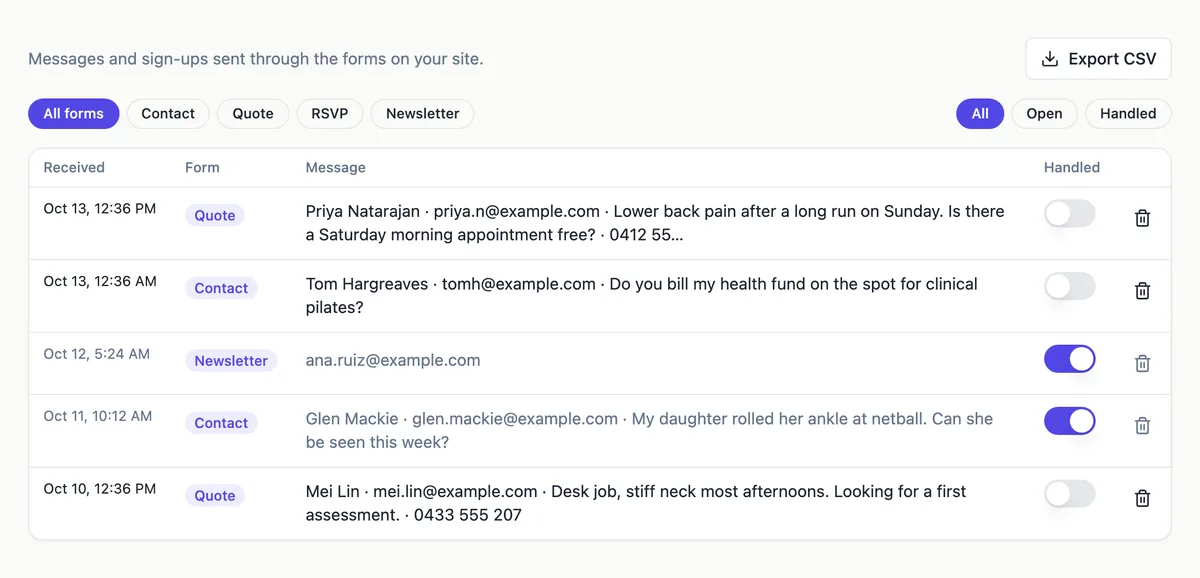
The form and its table
A fixed form such as contact, quote request or application gets its own table with typed columns, such as name, email, phone and message, plus the time it arrived and a status of new or handled. Anyone can send the form, but only admins can read the rows. A hidden honeypot field catches simple bots, and a database rule refuses more than 10 sends from one email in an hour.
Reading responses
In /admin each form has a responses table, newest first, with search and a Mark handled action, and with the csv capability an export to a spreadsheet. On the page, the form sits in a card beside your contact details, shows a status line while sending, and clears its fields once the message is sent.
Email alerts and their limit
The site sends mail only through OneCraft's mail broker, and the broker sends only for a signed-in person: to their own address, or to yours, 20 an hour. A visitor who is not signed in can still send the form and the message is stored, but no email reaches you. Check the admin, or give the site accounts if you want an alert per message.
Forms you build yourself
When you want to make your own forms, the agent adds a forms table whose fields you add, remove and reorder in the admin, and a renderer that draws each field on the page. Quizzes and polls work the same way and show a score or the totals after sending.
How it works, in three steps
Step 1
Ask for the form
List the fields in the generator's brief, or ask in chat for a contact form on a site you already have.
Step 2
Give it a database
Every plan gets a hosted site database, or you can connect your own Supabase account in the site's Settings, Database card.
Step 3
Check it and publish
Sign in to /admin with the admin account the agent reports, try it in the preview, then publish from the builder on a paid plan.
Limits worth knowing
- No email alert reaches you for messages from visitors who are not signed in; they are stored and read in the admin.
- Responses are in your site's own admin; there is no messages screen in OneCraft itself.
- Pushes to phones and SMS are not available.
- A hosted database comes with every plan, or you can connect your own Supabase account in the site's Settings, Database card.
- The Free plan builds and previews a site but cannot publish it, connect a domain, take payments or run Expo builds.
Questions people ask
Why didn't I get an email when someone filled in my form?
Because the visitor was not signed in. The mail broker sends only for a signed-in person, so a message from a guest is stored in the form's table and waits in your site's admin. Open /admin and the form's responses to read it. If you need a mail for every enquiry, visitors have to sign in before they send.
How does the form keep spam out?
The form has a hidden honeypot field that people never see; a bot that fills it is refused. A database rule also refuses more than 10 sends from one email address in an hour. The table accepts new rows only, so a bot cannot read earlier messages. Keep fields few so real people are not slowed down.
Can I reply to a message from the admin?
Not from the admin itself; reply from your own email to the address the visitor gave, which the admin shows. Mark the row handled once you have answered, so the list shows what is still open. With a customer list in the admin, the message also joins that person's timeline.
Which fields should a contact form ask for?
Name, email and the message are enough for most businesses; add phone when you call people back, and a select for the reason when enquiries go to different people. Each extra field lowers how many people finish. Tell the agent the fields in the brief, or ask in chat later, and the table and the form change together.
Where are the messages actually stored?
In your site's own database: a schema in OneCraft's pool on every plan, or a project on your own Supabase account. Each form has its own table with row level security, so only your site's admins can read it. A database on your own account can also be opened in Supabase.
Can the form carry a privacy notice?
Yes. Ask for a line under the form that says why you collect the details and links to your privacy policy; the legal capability can write the policy page. Keep the notice short and true to what the site stores: the fields in the form, the time sent and the handled status.
Make your own website
The button opens the generator with this use case already described. Change the wording to match yours, generate, then edit anything you like.
Create a website with OneCraftNot ready to start? See the AI website builder page first.
Related pages
Booking request form for your website that offers only free times
A booking request form for a website lets a client pick a service and a time and send the request to you to confirm. On OneCraft the agent writes it with the bookings guide: services, staff and working hours, a booking page that shows only free times, and a database rule that refuses double bookings.
Nonprofit website maker: show the mission, prove the impact, ask for help
A nonprofit website has to earn trust from people who will never visit in person: donors, volunteers, partners and the people it serves. It does that with a plain statement of the mission, numbers that show the work, one real story and a clear way to help.
Live chat for your website, built in rather than plugged in
Live chat on a website lets a visitor ask a question and get an answer while they are still on the page. Built into the site, it needs no third party widget or script, and conversations live in the site's own database where only the person and your staff can read them.
More finished work of this kind is on the website examples hub.
Sources
Written and checked by the OneCraft team. Last checked .