Websites
Online ordering for restaurants from your own menu and kitchen board
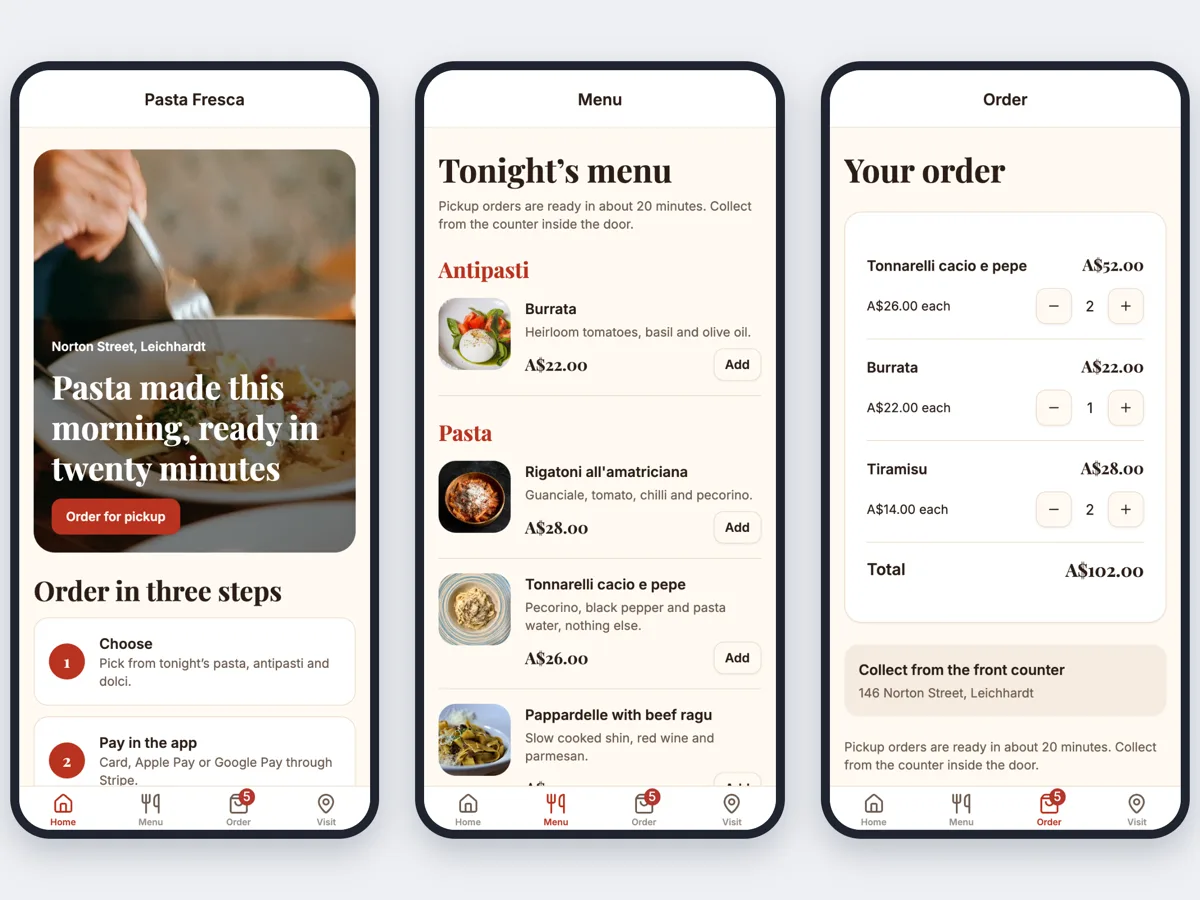
Online ordering for restaurants lets guests order from your menu on your own website, for pickup, at the table or for delivery, and sends each order to the kitchen. On OneCraft the agent writes this with the menu and orders guides: your menu with options and allergens, a checkout priced in the database and a kitchen board in your site's admin.
The menu
Menu groups can have hours, such as breakfast until 11, and items carry a price, photo, dietary badges, allergens in plain words, a spice level and a Sold out switch. Option groups such as Size or Extras add to the price and can be required or limited. Specials with start and end dates show at the top of the menu and on the home page, and the header says open now or when you next open.
Pickup, table and delivery
Checkout sends the order as pickup with a time, as a table order, or as delivery. Table ordering works from a link such as /menu?table=12, which keeps the table number for the visit, so the checkout asks for no address. Place_order prices each line from the menu and its options, and refuses sold out items, missing required choices and orders while you are closed, unless the pickup time falls in a later open time.
Table QR codes
The admin has a printable page with one QR code per table, each linking to the menu with that table number. Guests scan it with their own phone camera and the menu opens with the table already set.
The kitchen board
With orders, the admin gets a kitchen board with New, Preparing and Ready columns for today's paid or confirmed orders. Each card shows the items, options, table or pickup time and how long ago it came in. Buttons move it along and record an event, and the board checks for new orders every 5 seconds.
Paying
Card payment uses Stripe Checkout on the restaurant's own Stripe account, with the total read from the order the database priced. Without Stripe connected, orders stay pending and the thank you page tells guests you will confirm them.
How it works, in three steps
Step 1
Describe the menu and ordering
In the generator, give the dishes, prices, options and allergens and say whether you take pickup, table or delivery orders; or ask in chat on your restaurant site.
Step 2
Connect Stripe and a database
Connect Stripe in account Settings, Payments. Every plan gets a hosted site database, or you can connect your own Supabase account in the site's Settings.
Step 3
Print the codes and publish
In /admin set your hours, print the table QR codes and open the kitchen board; publish from the builder on a paid plan.
Limits worth knowing
- The kitchen board refreshes every 5 seconds rather than live.
- In a phone app the table number comes from a link or is typed in; the app cannot scan QR codes.
- Pushes to phones and SMS are not available.
- The agent seeds only the dishes, prices and allergens your brief gives, and adds a line asking guests to tell staff about allergies.
- Card payments need Stripe connected in account Settings, Payments, and a paid plan. The platform fee is 2% on Starter, 1% on Pro and 0.5% on Pro+, with Stripe's own fees on top.
- A hosted database comes with every plan, or you can connect your own Supabase account in the site's Settings, Database card.
- The Free plan builds and previews a site but cannot publish it, connect a domain, take payments or run Expo builds.
See it on a finished piece
Questions people ask
Is there a commission on every order like a delivery app?
There is no per order commission beyond the platform fee on card payments: 2% on Starter, 1% on Pro and 0.5% on Pro+, plus Stripe's own fees, and you pay the monthly plan to publish. You also do not get a delivery app's audience or drivers, so many restaurants use their own site alongside an app.
How do I mark a dish sold out for tonight?
Flip its Sold out switch in the menu part of your admin. The menu shows it as sold out straight away and place_order refuses it, so a guest who already had it in the cart gets a plain message at checkout. Switch it back the next day; the dish, its price and its options are kept.
Can guests order before the restaurant opens?
Yes, for a pickup time inside your opening hours. Place_order refuses orders while you are closed unless the chosen pickup time falls in a later open time. Opening hours are set per weekday in the admin and closures for holidays are added by date, so the header and the checkout both know when you are open.
How will the kitchen notice new orders?
Keep the kitchen board open on a screen during service, such as a tablet by the pass. New orders appear within about 5 seconds, with the items, options and table or pickup time, and staff move each card from New to Preparing to Ready. Pushes to phones are not available, so the board is the place to watch.
How are allergens shown to guests?
Each item stores its allergens and dietary tags, and the menu prints them in plain words with badges such as vegan or gluten free. The agent never invents them: it uses only what your brief or your admin entries say, and adds a line under the menu asking guests to tell staff about allergies.
Can we take delivery orders too?
Yes. Add the delivery capability and orders can be delivery as well as pickup or table: zones by postcode with a fee, a minimum order and free delivery over an amount, plus time slots and a tracking page your staff update. Drivers work from the admin; live driver location is not available.
Make your own website
The button opens the generator with this use case already described. Change the wording to match yours, generate, then edit anything you like.
Create a website with OneCraftNot ready to start? See the AI website builder page first.
Related pages
Restaurant menu website maker: the menu first, then everything around it
A restaurant menu website exists to answer four questions fast: what do you serve, how much is it, when are you open and where are you. Everything else, the story, the gallery, the ordering, is useful only once those four are one tap away on a phone.
Website newsletter signup: collect addresses and send from your admin
A website newsletter signup asks visitors for their email so you can send them news later, with a way to unsubscribe. On OneCraft the agent writes it with the email guide: a subscribers table, a sign-up form, an unsubscribe page, and a newsletter screen in your site's admin that sends through OneCraft to confirmed subscribers.
Donation website builder with campaigns and monthly giving
A donation website lets people give online, once or every month, to a cause or a campaign with a goal. Donors want a few suggested amounts, a clear total raised and a receipt; the organisation wants the money in its own account and a list of who gave.
More finished work of this kind is on the website examples hub.
Written and checked by the OneCraft team. Last checked .